Skip to content

Business process automation for B2B companies

Automate B2B orders and inquiries. Keep your team in control.

NovaFlow builds automation for incoming B2B orders, customer inquiries and club administration. The system reads, checks and prepares the data. Your team reviews and approves.

  • Interactive demos you can try today
  • A person approves every result
  • Adapted to the systems you already use
Example of an order flow · synthetic data

Works with the documents you already receive

E-mailPDFExcelCSV

Data ready for import into your ERP or accounting system

Solutions

Concrete solutions for real business tasks

Two B2B solutions for orders and inquiries, plus a separate solution for sports clubs. Try the demos, then we adapt the solution to your data and systems.

B2B solutions

novaflow-orderflow.vercel.app
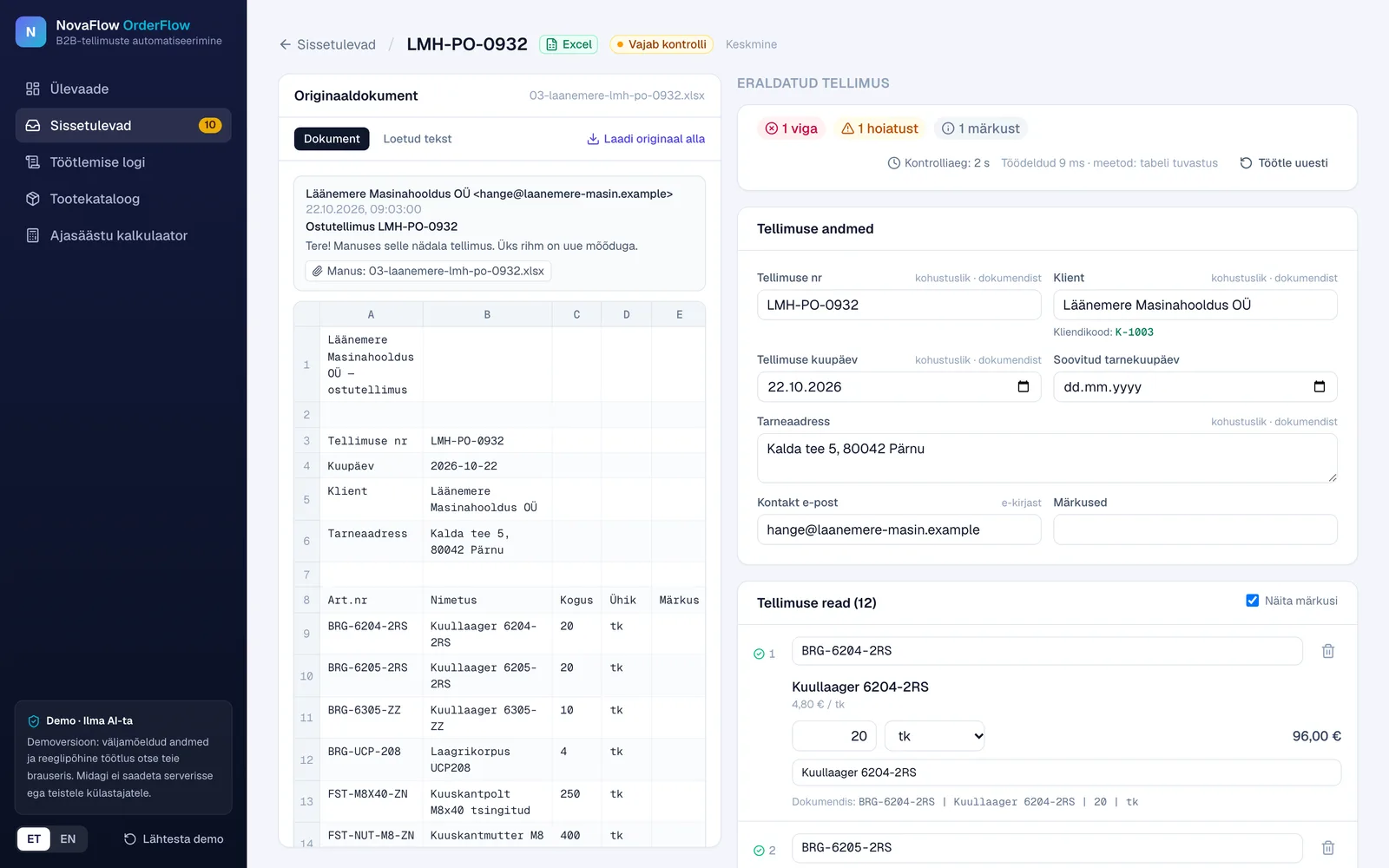
NovaFlow OrderFlow demo: an Excel order on the left, extracted order data with one error, one warning and one note on the right
Screenshot of the public demo
B2B order processingCore B2B solution

NovaFlow OrderFlow

B2B orders from e-mails and PDF, Excel or CSV files are extracted, matched with your catalog and checked for problems. Once an employee approves, the order is ready for import.

Workflow

  1. 1Incoming order
  2. 2Data extraction
  3. 3Product matching
  4. 4Error detection
  5. 5Human review
  6. 6Export

What it does

  • Less manual retyping of order lines
  • Item codes, units and quantities checked against the catalog
  • Missing fields and possible duplicate orders flagged
  • Nothing moves on without employee approval
  • CSV or Excel export for your ERP or accounting system
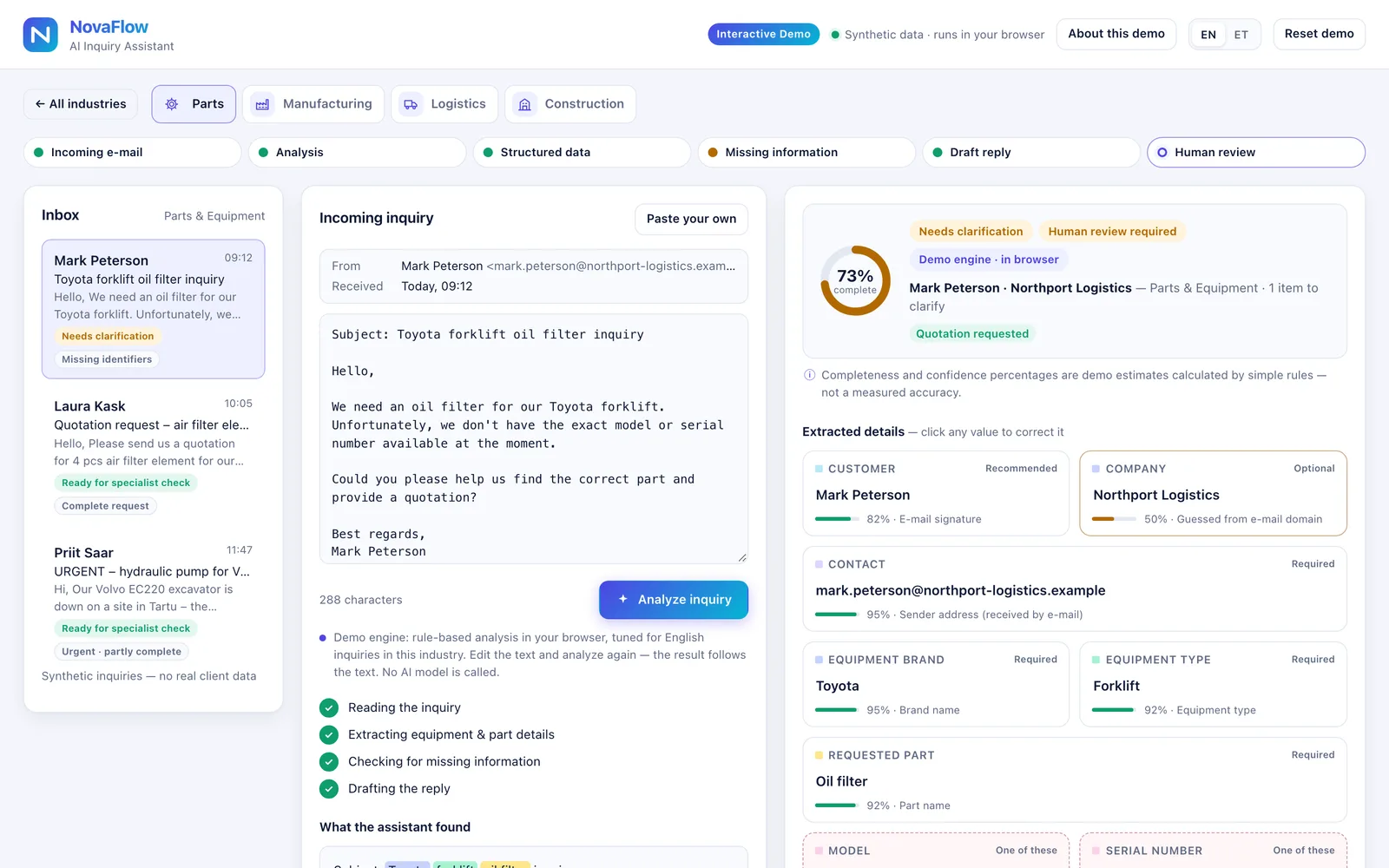
novaflow-ai-inquiry-assistant.vercel.app
NovaFlow Inquiry Assistant demo: an incoming inquiry with extracted customer, equipment and part details and their completeness
Screenshot of the public demo
B2B inquiry processingCore B2B solution

NovaFlow Inquiry Assistant

Customer inquiries become structured data: key details are extracted, missing information is flagged and a draft reply is prepared for review.

Workflow

  1. 1Incoming inquiry
  2. 2Information extraction
  3. 3Missing details
  4. 4Draft reply
  5. 5Human approval

What it does

  • Key details extracted from free text
  • Missing information detected before you quote
  • A structured overview of each request
  • An editable draft clarification reply
  • Every reply reviewed and sent by a person

Separate direction

Sports club administration

Sports Club Manager

Students, groups, schedule, attendance and monthly fees in one place, with separate views for the club admin and for parents or athletes.

Adapted to your sport and club.

What it does

  • Students and groups
  • Training schedule
  • Attendance
  • Monthly fees, bank transfers and overdue payments
  • Reminders and announcements
  • Parent and athlete view
  • Club logo and colours
  • Estonian, Russian and English
sports-club-manager-demo.vercel.app
Sports Club Manager demo: club overview with students, paid and unpaid fees, transfers waiting for confirmation and attendance by group
Screenshot of the public demo

The public versions are interactive demonstrations with synthetic data. They are not connected to any customer's ERP, CRM, mailbox or bank. The commercial solution is built and adapted to each customer's infrastructure.

How it works

From your workflow to a working system in four steps

We start from how your team works today, not from technology.

  1. 01

    Understand the workflow

    We map how orders, inquiries or admin tasks move through your team today: where the data comes from, who checks it and where it ends up.

  2. 02

    Build a relevant prototype

    You see a working prototype with documents and data similar to yours, so you can judge the result before committing to the full build.

  3. 03

    Customize and integrate

    We adapt rules, fields, checks and exports to your products and processes, and connect the system to the tools you already use where technically possible.

  4. 04

    Deploy and support

    We launch together with your team, follow the first weeks closely and keep improving the system as your processes change.

Who we help

For companies where orders, inquiries and admin work repeat every day

  • Manufacturing

    Orders and RFQs with drawings, materials and quantities.

  • Technical suppliers

    Spare parts, item codes and compatibility questions.

  • Distributors and wholesalers

    High order volumes from e-mails, PDFs and spreadsheets.

  • Logistics

    Transport requests with routes, cargo, weights and dates.

  • Construction

    Material requests with specifications, sites and delivery dates.

  • Sports organisations

    Members, groups, training schedules and membership fees.

Custom automation

Have a different process in mind?

Besides our three solutions, we automate specific processes in your company. Each project has a clearly defined scope, and a person stays in control.

Describe your process
  • Documents and spreadsheets

    Reading, filling in and comparing documents and tables.

  • Internal approvals

    Clear approval steps for purchases, invoices or requests.

  • CRM processes

    Keeping customer data, follow-ups and tasks up to date.

  • Recurring admin tasks

    Reports, reminders and routine checks that repeat every week.

  • Data exchange between systems

    Moving data between systems without copy and paste.

About NovaFlow

Practical automation for real business tasks

NovaFlow builds systems that take repetitive administrative work off your team: reading documents, moving data between systems, preparing replies and keeping records in order. We work mainly with companies in Estonia.

We don't sell abstract artificial intelligence. We start from a concrete task, show a working result early and choose the simplest technology that solves it reliably: rule-based logic where it is enough, AI where it adds real value.

NovaFlow logo
  • Practical

    We automate what takes your team the most time, not what sounds impressive.

  • Transparent

    You know what the system does, what it doesn't do and what it costs.

  • Human in control

    Important decisions stay with your people. The system prepares, a person approves.

  • Real business tasks

    Every solution starts from a concrete workflow and is judged by how it works in daily use.

FAQ

Frequently asked questions

How long does implementation take?

It depends on the process, the quality of the data and the integrations. After the first conversation and a review of sample documents you get a concrete plan with stages and a timeline. Adapting one of our existing solutions is considerably faster than building from scratch.

Can the solution be adapted to our products and processes?

Yes, that is the point. Fields, rules, checks, product catalogs, languages and export formats are configured for your company. The demos show the principle; the commercial version is built around your data.

Does it work with our ERP, CRM or accounting software?

In most cases, yes. The simplest route is a file export (CSV or Excel) in the format your system already imports. If your system has an API, we can also connect directly. We review the options with you before any work starts.

How is our data protected?

Data is processed only for the agreed purpose, and access is limited to the people who need it. We agree together where data is stored and processed (for example within the EU) and how long it is kept, in line with the GDPR. The public demos use synthetic data only.

How much does it cost?

The price depends on the scope, the integrations and the level of support you need. After we have reviewed your workflow, you receive a clear proposal with the implementation price and the cost of ongoing support before any work starts.

Do you use artificial intelligence?

Where it is useful. Our public demos run on rule-based logic and do not call any AI model. In a customer project we choose the approach per task: rules where they are reliable, AI models where documents vary too much. A person always reviews the result.

Is the demo the finished product?

No. The demos show how the workflow works, using synthetic data. They are not connected to real mailboxes, ERP, CRM or banking systems. The commercial version is built and integrated separately for each customer.

Do you provide support after launch?

Yes. We monitor the system after launch, fix issues and adapt the solution when your products, documents or processes change.

Contact

Let's discuss your workflow

Tell us briefly which process takes your team the most time. We reply by e-mail and, if it makes sense, suggest a short call to look at it together.

Prefer e-mail? Write to us directly at teamnovaflowhq@gmail.com